Billing Center
The Billing Center shows the organization's fees and balance. LakeInsight Cloud bills by actual usage and deducts fees from the organization balance, which consists of a cash balance (from recharges) and gift quota (granted by the platform); the first registration grants a ¥1,000 trial balance.
Go to Usage & Billing → Billing Center to open the page.
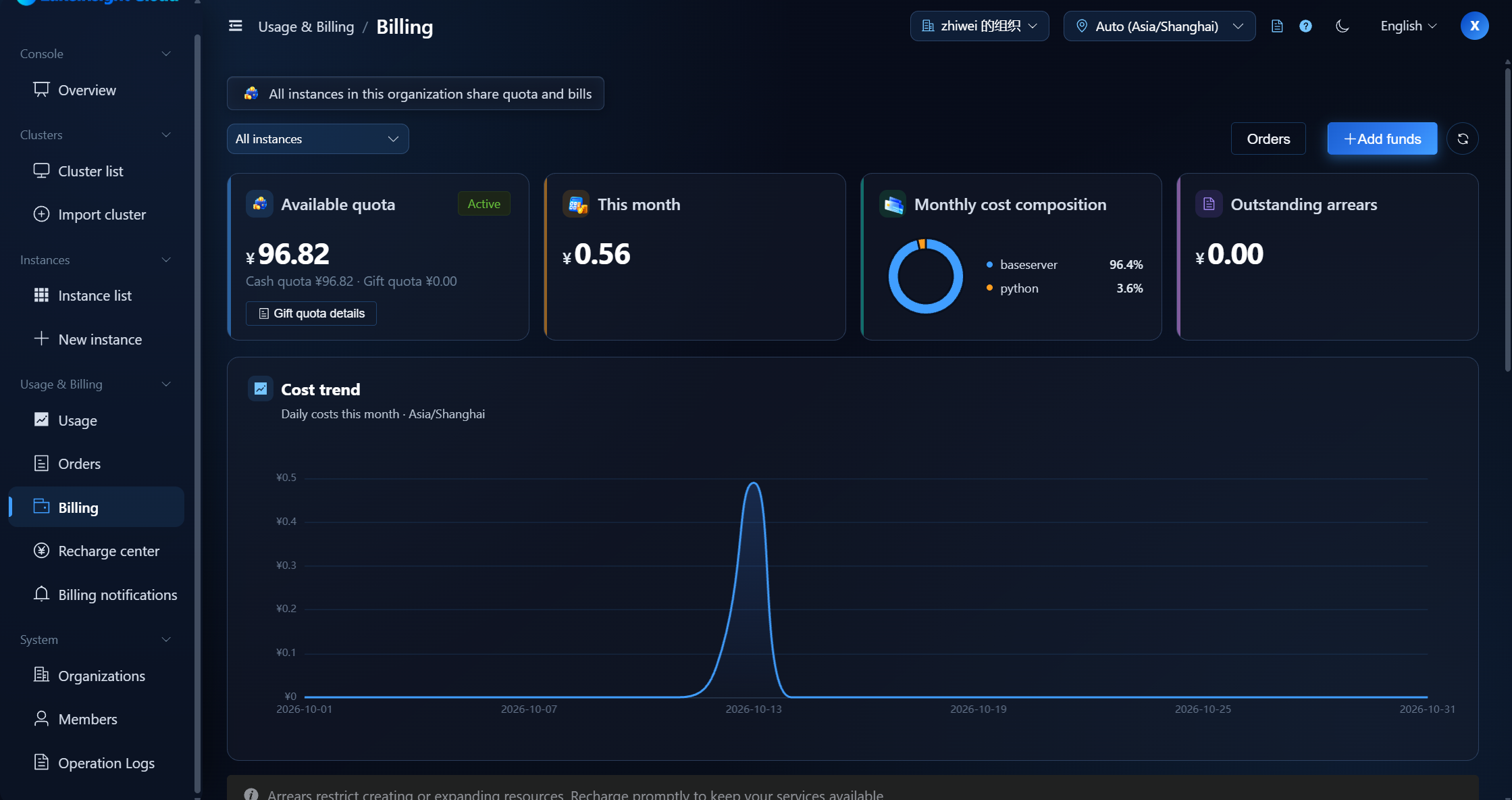
What You Can See
- Available balance: the balance available to pay for instance fees (cash balance + gift quota)
- Account status: active / overdue / frozen / closed
- Current month's fees: fees generated this month, plus the invoice-eligible portion excluding gift deduction
- Composition of this month's fees: a donut chart of fees by job type
- Unpaid arrears: the part the balance could not cover
- Fee trend: the daily fee curve for the current month
- Cost by instance: the settled fees of each instance this month; click a row to filter by that instance
- Monthly bills: the monthly bill list and details (gift deduction and invoice-eligible amount included)
- Current pricing rules: the current CRU unit price and job type coefficients
Consumption is deducted from the available balance first; anything beyond it is recorded as arrears. When a recharge arrives, it settles arrears first and the remainder adds to the available balance.
Insufficient Balance & Arrears
When the balance is not enough to pay for instance fees, the platform sends a low-balance reminder:
- Consumption is deducted from the available balance first; anything beyond it is recorded as arrears.
- After arrears occur, instances enter the grace period (7 days by default) and can still run normally. While in arrears or with a frozen account, creating instances or expanding resources is restricted. The account status becomes Overdue, and the instance's job-admission status becomes In grace period.
- If the balance is not replenished when the grace period ends, the instance's job-admission status becomes Blocking expected and running instances may be suspended; after you recharge, suspended instances automatically recover and the arrears are deducted.
- After an instance is suspended, recharge to restore the balance and restore the instance using the operations provided by the platform.
Keep an eye on the account balance and fees to avoid instance suspension. Set a reasonable balance alert threshold and watch the balance reminders in the billing notifications.
Invoicing
Recharge is a prepayment. Invoicing is based on the amount actually paid in cash after consumption; portions deducted by gift quota or vouchers are not invoice-eligible. For the exact process, follow the platform's finance procedures.
Pricing Rules
Fees are calculated as:
Fee = CRU × runtime (hours) × CRU unit price × job coefficient
Where:
- CRU = max(CPU cores, memory GiB ÷ 4)
- Runtime (hours) = runtime minutes ÷ 60 (CRU × runtime = cumulative usage, CRUh)
- CRU unit price: ¥0.05 / CRU / hour
- Job coefficient:
| Job type | Coefficient | Effective price |
|---|---|---|
| baseserver | × 0.5 | ¥0.025 / CRU / hour |
| compute | × 1.0 | ¥0.05 / CRU / hour |
| python | × 1.5 | ¥0.075 / CRU / hour |
| query | × 1.1 | ¥0.055 / CRU / hour |
| ray | × 1.5 | ¥0.075 / CRU / hour |
| streaming | × 1.2 | ¥0.06 / CRU / hour |
Example: a 2-core / 6 GiB
streamingtask running 30 minutes → CRU = 2, runtime = 0.5 h, cumulative usage CRUh = 1, fee = 1 × ¥0.05 × 1.2 = ¥0.06.
Billing settles in UTC hours; the prices and coefficients above are the current defaults, and the fee actually charged follows the rules in effect at settlement time, which you can check under Billing Center → Current pricing rules.
Next Steps
To recharge, see Recharge Center; to view orders and their progress, see Orders.